How to test for Clickjacking vulnerability
We've all been there. We go to a planning session or a security audit check, and someone mentions 'compliance'. They say, “Just verify against the OWASP Top 10”. And you are left alone with so many paragraphs of guidance, wondering where to even begin. Note: Clickjacking isn’t in the OWASP Top 10!
As testers, we all perform different types of tests. You can verify that a login page performs its intended function and confidently provide a test sign-off. But imagine an attacker overlaying an invisible layer your user never sees. That perfectly tested, signed-off login page now has a security breach through a transparent iframe. Your functional test success now becomes a security failure.
In this guide, I will walk you through what Clickjacking is, the security headers that prevent it, and how to actually test.
What is Clickjacking?
Clickjacking is a cyberattack where a malicious attacker tricks an authenticated user by placing a layer over a link or a button to take you to a fake site embedded inside the real one or to authorise an action that could cause you harm. Think of it as the cyber equivalent of putting a card reader over an ATM. It tricks you into clicking or entering information into something added instead of what you should be.
How the attack works
Imagine a website as a digital bulletin board. Normally, only the site owner controls what is pinned and displayed. However, if the website has a security flaw, a hacker can easily sneak in and redirect you. A clever attacker can build a malicious page just like the original. They pin something that looks as though it belongs, but actually takes you to a fake site, or downloads malware.
The “transparent layer” is simply the victim site loaded inside a malicious <iframe> on an attacker-controlled website, whereas an <iframe> is an HTML element that lets you embed one website inside another (like embedding a YouTube video). In an attack, the attacker embeds the target site inside an iframe on their malicious site.
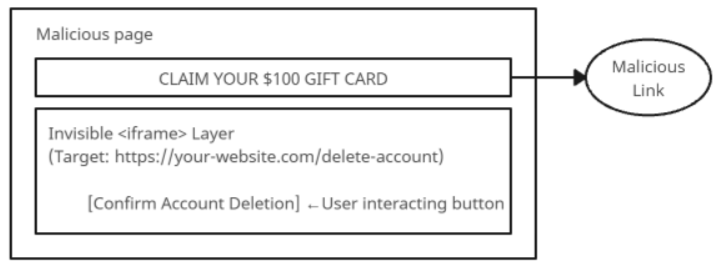
The attacker sets the iframe completely invisible and positions it directly over an enticing decoy on their page, such as a ‘Claim your $100 Gift Card’ button. When a victim visits the page and clicks on the decoy, their action is registered on the invisible target page. From there, they can perform actions like deleting an account, transferring funds or changing a password in the background.
Why does basic functional testing not find it?
Standard QA and automated tests are designed to verify that an application functions as expected under the intended use case. Clickjacking is not detected due to a few key reasons:
- They verify that the application operates correctly and performs exactly as intended. For example, it receives a valid click, uses the user’s active session, and executes the requested action.
- Lack of visual/header assertions. Functional tests validate DOM elements, form submissions and API responses. They don’t validate whether the application has frame embedding restrictions.
- Automated tests run on the isolated platform. Functional end-to-end tests (Playwright, Cypress, or Selenium) typically run in their own top-level window context, rather than embedded within a third party. If any do run on the live environment, it is often a smaller subset.
Despite the fact that web browsers are more secure than ever, Clickjacking remains a critical security issue for several reasons.
- Developers forget to add the proper headers. Preventing clickjacking requires explicit instructions, such as Content-Security-Policy, frame-ancestors or X-Frame-Options. Not applying these headers results in the application being vulnerable.
- Legacy systems not using modern headers. Older enterprise applications frequently lack modern security header configuration.
- Legitimate framing requirements. Nowadays, most modern services need to be embedded in third-party services such as payment gateways. These types of requirements can open the door for malicious attacks.
The Impact
If an attacker can trick an authenticated user into interacting with a fake page, clickjacking can lead to:
- Unauthorized transactions, which lead to triggering transfers or purchasing endpoints.
- Hijacking OAuth authorisation, which tricks users into granting access and permission to third-party applications
As a tester, testing the user workflow is not enough. Catching clickjacking risks at an early stage prevents them from reaching the production environment.
Imagine you have a fully functional website or a web app that is bringing you constant revenue. At this point, an attacker comes and takes your website and loads it inside an invisible <iframe> layer that is built on top of a malicious web page. For example, it may appear as a simple 'Play Video’ button, but in reality, the user is tricked into clicking through that transparent layer, which will trigger actions like account deletion, fund transfer or even downloading personal details.
Security mechanics: The response headers
Content-Security-Policy: Frame-ancestors
The modern standard for framing control is the frame-ancestors setting within the Content-Security-Policy (CSP). A CSP header is a trusted guest list of libraries for your website, as well as covering many other resource types. It will direct the browser to determine which scripts, images, files, and other resources can run on your page, as well as their sources.
- Content-Security-Policy: frame-ancestors ‘none’ This disallows any domain from framing the page.
- Content-Security-Policy: frame-ancestors ‘self’ This will only allow pages from the same origin.
CSP allows a list of trusted domains or subdomains. It also covers all embedding types, such as frames, objects, applets, and embeds. CSP rules also apply through nested frames, preventing multi-tiered framed attacks.
X-Frame-Options
This is the legacy way of setting up headers to prevent such clickjacking vulnerabilities. This option can be set with any of the following parameters.
- DENY: This parameter implies that the page cannot be displayed in an iframe at all.
- SAMEORIGIN: This parameter implies that the page can only be displayed in a frame that has the same origin as the page itself.
Note: ALLOW-FROM is obsolete and not widely supported
One of the drawbacks of X-Frame-Options is that it cannot cleanly handle multiple allowed origins. It behaves inconsistently across browsers when nested inside multiple frames.
Modern web browsers receive both Content-Security-Policy: frame-ancestors and X-Frame-Options on the same HTTP response. They recognize frame-ancestors as the highest-priority directive and ignore X-Frame-Options. But there can be scenarios where older browsers, such as legacy webviews, do not support CSP. In this case, it will ignore frame-ancestors and fall back to processing X-Frame-Options.
How to test Clickjacking?
Testing this vulnerability is quite simple once you understand it. With no complex setup, you can use a quick HTML file to test this in a few minutes.
Step1: Create and Save your PoC HTML file
Follow these simple instructions to create your own HTML file to test with.
- Create an HTML file by opening a basic text editor such as Notepad or TextEdit.
- Copy the following code, replacing your test website for the bold 'your-test-site-url'
<html>
<body>
<iframe src="<your-test-site-url>" width="500" height="500"></iframe>
</body>
</html>
- Once done, save it locally where it is easy to find. Maybe try a Clickjack folder on your desktop while you get used to the process.
- Rename it as 'clickjack_test.html' or similar. The important part is the .html file extension.
- Then use the 'Save as' function of the editor to save to your chosen location.
Congratulations on creating your file. You are now ready to run the test in step 2.
Step 2: Load the file in your browser
- Open your preferred web browser (Chrome, Firefox, Edge or Safari)
- Locate 'clickjack_test.html' on your computer or drag and drop it into the opened browser. Or double-click on the file to open it.
- Observe how the browser renders the page.
Observations:
- If your website is loaded inside the iframe as displayed in Figure 01, it could be considered vulnerable. Check if the framing is intentional and permitted.
- If the frame is blank or displays an error saying the URL refused to connect, as in Figure 02, then it is protected.
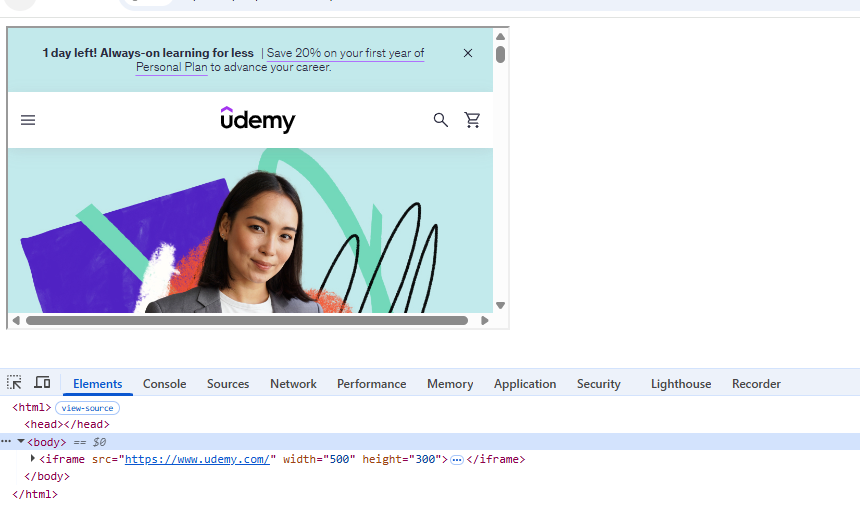
Figure 01: The website is loaded inside the frame
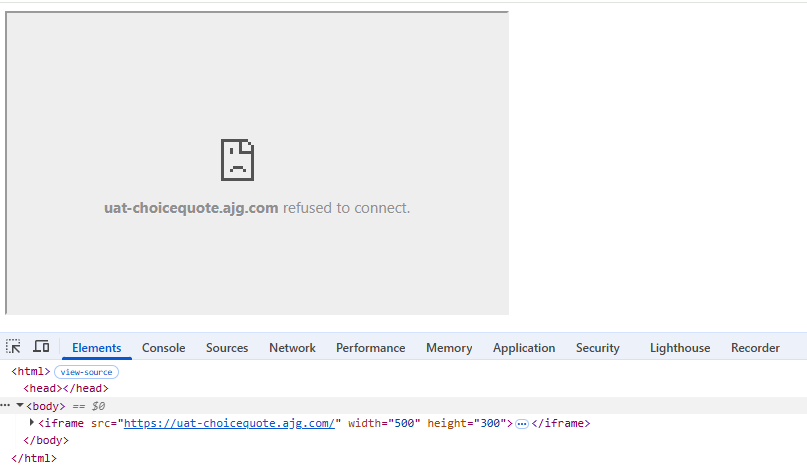
Figure 02: The website is blocked from loading inside the frame
Step 3: Check Browser DevTools
- While viewing your 'clickjack_test.html' page in your browser, open the Developer Tools by pressing Ctrl+Shift+I or Cmd+Option+I for macOS.
- Navigate to the Console Tab
- Reload the Test page
- Inspect the Security Violation errors
Observations:
- If the website loads, there is a problem. If the framing is blocked, the browser will report that the page could not be displayed because of the Content Security Policy or the X-Frame-Options configuration, as shown in Figure 03. A typical CSP header violation error would look like the example below, Connecting to 'https://widget.trustpilot.com/bootstrap/v5/tp.widget.bootstrap.min.js.map' violates the following Content Security Policy.
- If the frame is blank or shows an error stating the URL refused to connect, as in Figure 2, the security controls successfully blocked the framing attempt.
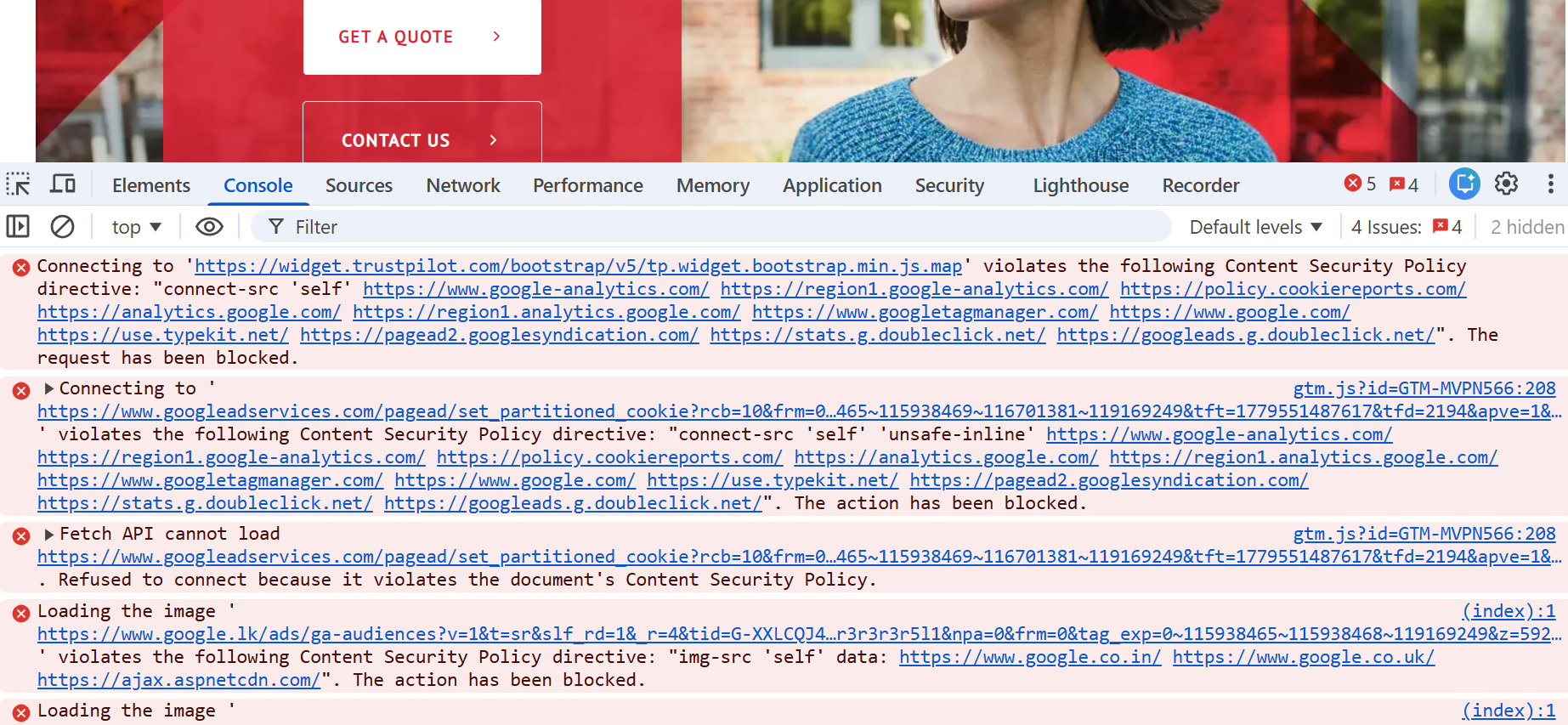
Figure 03: A website loaded with CSP header violation errors in the Console log
Security headers are specialized instructions sent by the web server to a user’s browser that command the browser on how to safely render the site, what resources to use and restrict unauthorized interactions. By default, web browsers render pages inside <iframe> tags unless explicitly told not to. If the server sends a response without anti-framing security headers, the browser tends to permit framing. This leaves the users completely exposed to UI redressing and clickjacking attacks.
When security headers are configured correctly, the frame-ancestors directly instruct the browser to evaluate any framing attempt before executing any HTML or scripts. This will help the browser to prevent attackers from aligning invisible layers over your page. Therefore, when a legitimate user accesses the site with active session cookies, the browser will refuse to render the target page within the malicious iframe, keeping their session safe. The two primary headers responsible for this protection are:
- X-Frame-Options: A widely supported header that can be set to DENY (blocks all framing) or SAMEORIGIN (allows framing only by the same origin).
- Content-Security-Policy (CSP) with frame-ancestors: A modern directive that explicitly specifies what domains are permitted to embed the page.
If the security headers are set, you should be able to verify them in the network tab. Inspect the response headers for the request targeting the page and verify the presence of X-Frame-Options and Content-Security-Policy as in the figures below (04 and 05).
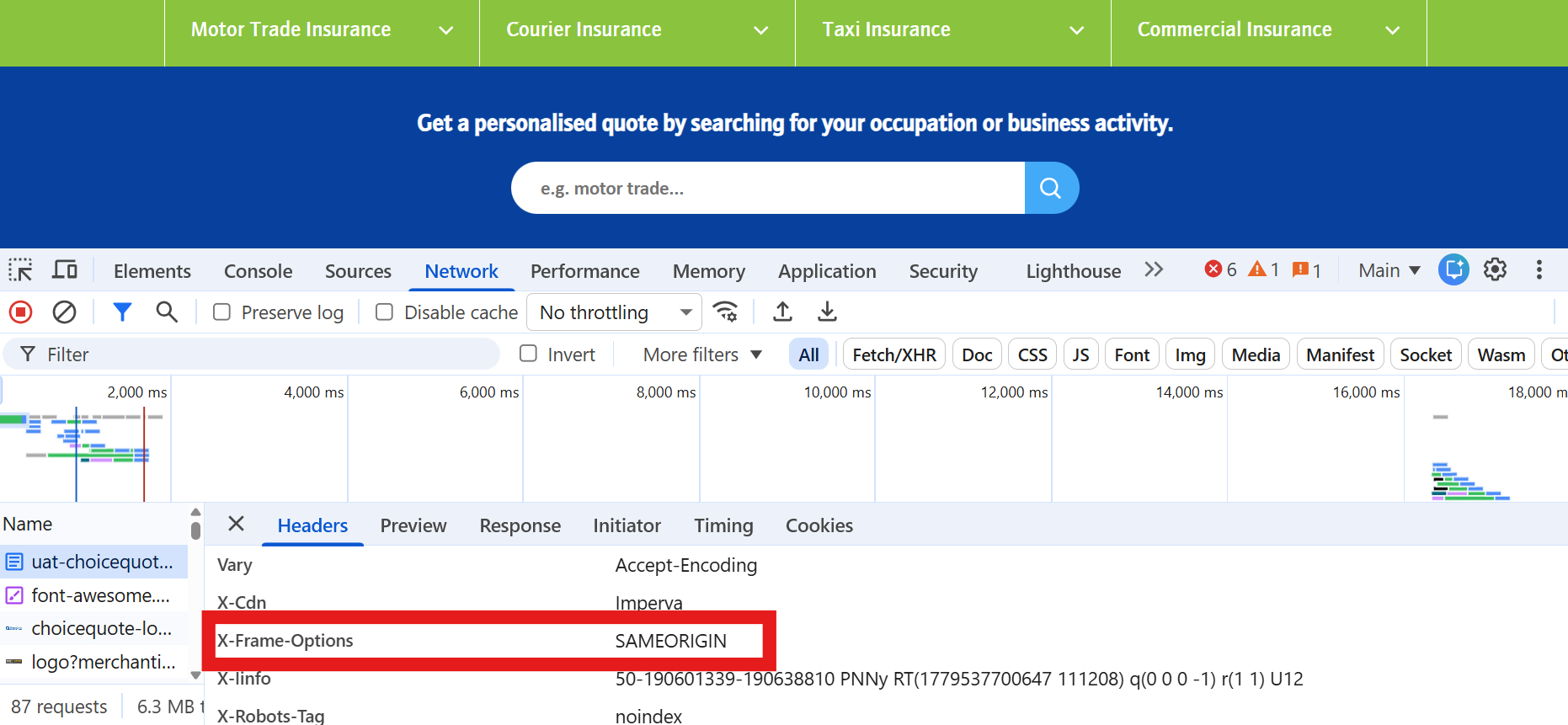
Figure 04: The X-Frame-Options is set to SAMEORIGIN
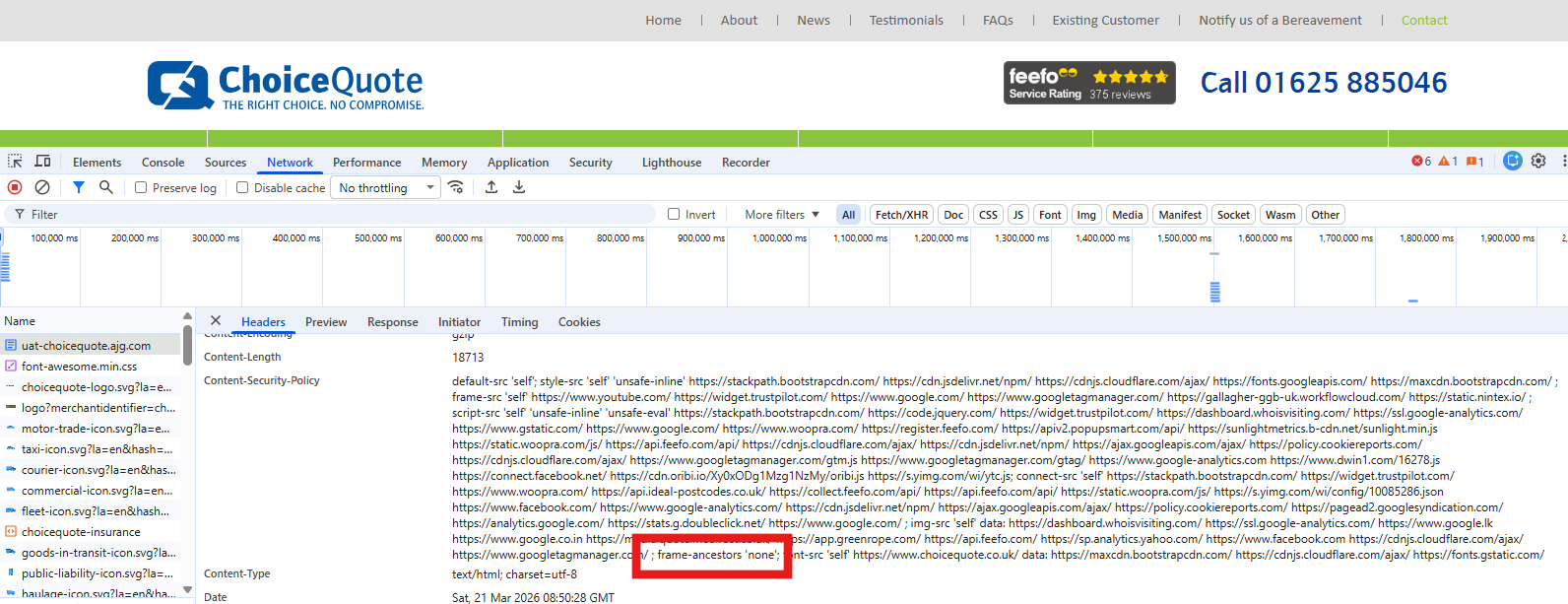
Figure 05: The frame-ancestors directive is set to ‘none’
It is recommended to test different endpoints of your website to ensure that the entire site is secure. Different endpoints such as login pages, API paths, user settings, landing pages, etc., are often governed by different microservices, which can lead to mixed protection levels across the site:
- Endpoint inconsistency: One endpoint might send a full security header while another critical form on another path lacks anti-framing rules. It is critical to verify every key functional page individually.
- Conflicting rules: Misconfigured setups where X-Frame-Options is set to DENY while frame-ancestors accidentally allow framing from specific origins, or vice versa. Both headers should be aligned across all the endpoints to prevent unexpected security gaps.
- Header conflicts: Modern browsers prioritize the CSP frame-ancestors over X-Frame-Options headers when both are set up. However, some older browsers may ignore CSP and solely rely on X-Frame-Options.
While request headers track how a browser initiates a connection, they cannot enforce the security rules on a page. They basically carry contextual information from the user’s browser to the web server. In contrast, the response headers are the authoritative commands sent from your server to the user’s browser. They dictate browser behaviour. They instruct the browser’s engine on how to handle the page content, which script to run and, more importantly, where the page is allowed to be rendered inside an <iframe>.
Running a simple HTML file gives you a quick glimpse into basic clickjacking, but real-world attacks can be far more sophisticated. You could learn about several other advanced techniques beyond this simple test if you want to keep learning.
- Opacity manipulation: Attackers rarely leave the frames completely visible. They tweak the CSS opacity property by setting the transparency to 0 and make the target page completely invisible. This creates a ghost page.
- Nested frames: Advanced attackers sometimes chain multiple frames together by embedding frames inside frames to trick scanners looking into the wrong DOM layer.
- Third-party Widget Integration: Modern websites rely heavily on third-party widgets such as payment gateways, customer support chats or social media feeds. If these third-party services lack proper framing protection, attackers can hijack those integrated frames to launch attacks.
Critical Testing Pitfall
A very common testing mistake for clickjacking is checking on the root node or the homepage and assuming that the security is added to the entire website. Applications rarely run on a single uniform server configuration. Different endpoints and subdomains are often handled by separate back-office services.
Inconsistent header configuration across microservices.
Modern applications use dozens of microservices. While the core pages enforce anti-framing headers, certain pages such as password reset or embedded widget endpoints might omit them entirely. An attacker only needs one unlocked door to enter.
Conflicting headers across endpoints
While testing for security header implementation, you may find conflicting header configurations that can result in silent security bypassing on specific routes, as browsers handle header conflicts differently depending on their versions.
- Endpoint A: Defines Content-Security-Policy: frame-ancestors ‘none’
- Endpoint B: Defines X-Frame-Options: SAMEORIGIN but forgets the frame-ancestors directive
- Endpoint C: Contradictory headers X-Frame-Options: DENY and X-Frame-Options: ALLOW-FROM
When testing for clickjacking, build a test list that covers all the sensitive routes across the application. Make sure to add the authentication pages such as login, logout, SSO, or password reset pages, the financial pages, embedded widgets, etc. This will ensure the test coverage is not just limited to functional and UI level testing but also extended to security-level testing as well.
To sum up
Clickjacking is a great reminder that security vulnerabilities can exist even when functionality works perfectly. Clickjacking vulnerabilities are common, but they can still slip in during server migrations and feature launches. Testing for clickjacking is not a one-and-done check. As we’ve seen, relying purely on functional testing is not enough.
But the good news is that, as testers, you now have the power and tools to run your own vulnerability checks and cover even more risks. You are now armed with an HTML PoC file, Browser Developer Tools, and know how to keep a sharp eye on response headers. You have seen how easy basic testing is. By making vulnerability testing a regular part of your strategy, you can keep your web applications and their assets protected. Security is a specialism, but like many specialisms, that doesn’t mean we can’t join in and find things ourselves.