How to test for Cross-site scripting (XSS) vulnerabilities
Search bars are everywhere. As a routine, we test for valid and invalid keywords, empty states, and long strings to see if we can break the layout. These are some of the essential QA checks that ensure UI stability. But treating the search bar as just another input/text box leaves a massive gap in your test coverage.
Treat every input field on your website as a potential door into your web application. If you keep the door unlocked, it not only puts the application at risk, but every user who visits the site and their data are in jeopardy. A single unchecked input field can let an intruder inject malicious executable code, steal sessions, and manipulate users into performing various activities. Testing to see whether that search bar treats your input as harmless text or executable code elevates your test suite from standard UI test coverage to fundamental security testing.
In this guide, we will explore what Cross-site scripting is, its impacts, how to test for it, and the engineering controls to prevent it.
What is Cross-site scripting?
Cross-site scripting (XSS) is one of the most common vulnerabilities found in web applications. It occurs when an application takes untrusted data, such as a search query, and displays it back on the page without proper sanitisation (cleaning user input) and encoding (making special characters into safer alternatives). This allows an attacker to inject malicious JavaScript into the site. This can lead to session hijacking, unauthorized access, credential theft, etc.
The impact
XSS vulnerabilities can pose serious risks to your web application.
- Perform unauthorized actions: The injected script can send requests on behalf of the victim, such as fund transfers, changing email addresses and passwords, etc.
- Session hijacking: Malicious attackers can take over an account and impersonate the victim without needing a password.
- Stealing credentials: A malicious attacker can trick users into entering valid credentials by injecting a fake modal overlay onto a legitimate page.
- Site defacement: An attacker may change the visual appearance of a site or webpage.
Types of XSS vulnerabilities
There are two types of Cross-site scripting (XSS) vulnerabilities in a search context.
Reflected XSS (Non-Persistent)
In this type of vulnerability, the malicious code is embedded in the URL or an input field. It occurs when user-supplied input is included in the server response without proper encoding. The malicious content is not stored permanently but is reflected back to the browser and executed when the victim loads the crafted request. Sending emails with a malicious link is one of the easiest ways to get users to click on the links. In this way, when the victim opens the browser, the malicious JavaScript code will get executed.
Such URLs carry parameters at the end of the slug, such as ?q=query, as shown below.
https://mysite.com/s?q=new<script>alert('XSS')</script>
Stored XSS (Persistent):
In this type of cross-site scripting, the payload persists on the website or web page. It is likely saved to a database and then retrieved. This is one of the critical vulnerabilities because the injected malicious script has the ability to affect the users who interact with the vulnerable site. Examples include comment sections, discussion forums, user profiles, support tickets and product reviews where submitted content is later displayed to other users.
How to test Cross-site scripting?
Take the search bar on your website or application. You should obviously be testing for different scenarios, such as entering a valid keyword, entering an invalid keyword, etc. But would you try entering a simple script or an HTML payload as shown below?
<i>Test Text Goes Here</i>
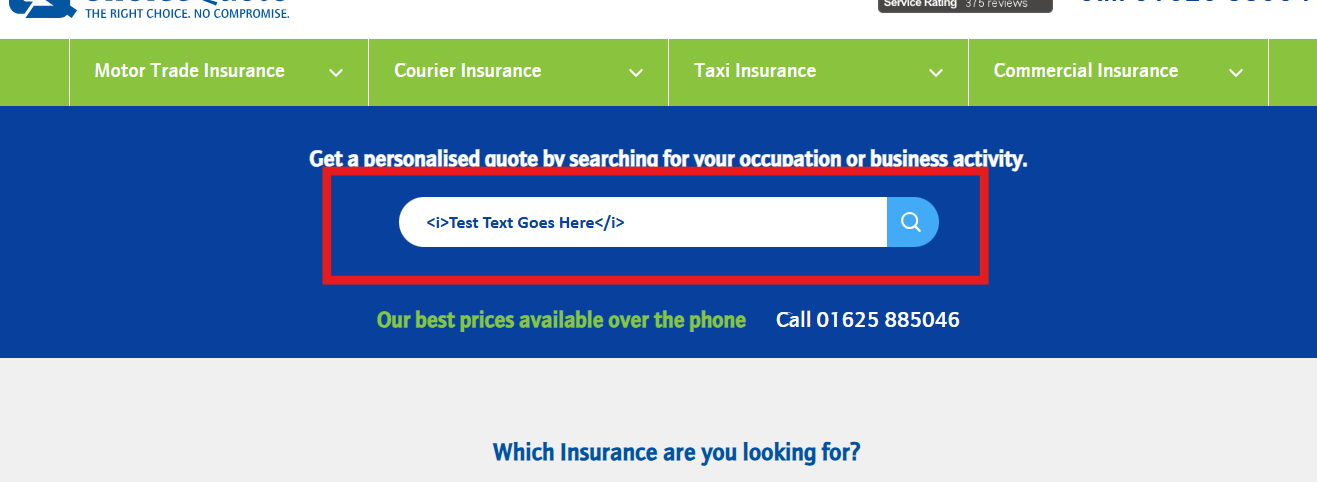
When you click the search icon and see that the search bar has treated the entered HTML payload as a code snippet, the entered text will be displayed in italics, as shown below.

Now this could be a critical vulnerability. This situation means there is a high risk that an attacker might inject malicious JavaScript that executes in the victim's browser. If the text is rendered in italics rather than displayed as plain text, the application is interpreting user-supplied HTML. This indicates missing output encoding and may lead to XSS vulnerabilities depending on how content is processed and rendered.
However, when testing XSS in shared, staging or production environments, we should be mindful not to use aggressive or destructive payloads. Because injecting heavy DOM modifications, cookie-stealing scripts, or recursive loops can trigger security alerts in heavily secured company networks, corrupt system data or even break the application for real users.
Instead, use safer ones as a proof of concept or a low-risk test to reveal vulnerabilities without causing unnecessary harm. The following examples are of low-risk:
- Harmless HTML Tags: Use simple styling tags such as <i>Test</i>, <b>Test</b> or <u>Test</u>. If the text renders in Italic, bold or underlined, then that means the application parses untrusted HTML without actually executing harmful code.
- Usage of non-disruptive payloads: Use mild pop-up scripts like console.log(‘XSS-Test’) or <script>alert('XSS')</script>. This confirms the execution of the script via a pop-up message without exposing or capturing sensitive user data. <script> can be blocked in modern applications. Absence of script execution does not necessarily mean the application is secure. XSS can occur through multiple contexts, including event handlers, DOM manipulation and client-side rendering paths. DOM-based XSS always occurs on the client side, so the server may never see the payload, but the risk remains.
Next is sanitization. This involves cleaning the data by stripping away dangerous HTML tags and JavaScript. By encoding special characters (e.g., converting < into <), we ensure the browser treats the input as plain text rather than executable code.

Beyond basic input handling, preventing Cross-site scripting requires an understanding of the technical controls. With this understanding, testers can move beyond the search bar and verify whether the application has the proper layer of defence.
- Server-side validationWhile the client-side checks are easy to bypass using tools like Postman or OWASP ZAP, server-side validation acts like a strict bouncer, closely inspecting all the incoming data before letting it pass through.
Bypass the frontend UI input fields with payloads and check if the server rejects inputs that contain dangerous tags or unexpected characters.
- Output encoding
This safely converts special characters into harmless display symbols right before rendering them on screen, such as converting < into < and “ into ". Simply type special characters (<, >, “, ‘) into the search input fields and inspect the browser console to confirm the characters are rendered as HTML entities.
- Safe librariesTools such as React and Angular automatically encode text by default. However, even these methods can be bypassed with unsafe methods like innerHTML or dangerouslySetInnerHTML. Verify that user input is not written directly into raw HTML properties such as innerHTML, and that framework-provided encoding mechanisms are used wherever possible. For example, in a rich text editor, the text formatting should be rendered, and for this, verify that well-established libraries are used instead of custom code.
- Content Security PolicyCSP is an instruction sent to the browser that tells it which scripts are allowed. A well-configured CSP reduces the impact of XSS vulnerabilities by restricting which scripts the browser can execute. To verify this, you must navigate to Network response headers for Content-Security-Policy. Verify whether the script-src blocks inline scripts (‘unsafe-inline’) and also check the browser console tab for any CSP-related error log.
- HttpOnly CookiesOne of the major goals of attackers is stealing users’ session cookies using JavaScript (document.cookie). To mitigate this, cookies should be marked as HttpOnly in order to completely block client-side scripts from reading them. In order to verify this, open DevTools -> Application -> Cookies and ensure the HttpOnly checkbox is enabled so that JavaScript cannot access them.
Actionable XSS Testing Checklist
Add this checklist into your test suite to systematically verify your application’s defences.
To sum up
Cross-site scripting (XSS) remains one of the most critical and dangerous web application vulnerabilities, but to capture them, your team doesn’t need security specialists. Do a little beyond the standard functional testing. Check how those input fields in your web application handle script structures. Security can't be a secondary thought. It is the process of identifying and sealing potential threats before they can be exploited.
Add one XSS test to every input field. That small change could find big risks.