How to test OTPs
Open a chat window with whichever AI model you use. Type: "How do I test an OTP?"
You can guess the majority of the answer before you press Enter. You will get ideas such as:
- Check that the code arrives.
- Check that it has the required number of digits.
- Check that a wrong code fails.
- Check that an expired code fails.
- Check the resend flow.
- Check the limits of resends.
Every one of those is correct, but it is just the surface. OTP (one-time password) testing is often a critical business function that opens the door to payment channels and protected customer data.
OTP testing looks like a small task. The logic behind that field travels across multiple systems and invisible boundaries. Your app, an authentication service, an SMS gateway, a mobile carrier, then a mobile phone in someone's pocket. Every boundary is a place where the logic can fail.
You're testing a security system that is distributed across five parties, and your screen shows you only the last step.
General material about OTPs can help you understand the vocabulary of this area. You can use AI to cover the obvious and use it fast. But it’s important to keep it as a starting point for your testing and not the endpoint. The ideas that find real bugs come from my hands-on experience and reports from the field. My ideas come from the work that I did early on in my career in a financial services project. I’ve seen OTPs fail in production. Sometimes, the code arrives late. I have also seen the code that was already used still working.
Latency, invalidation, session binding, predictability. Each one sits at a different point in the life of the code, so that is how I've organized the tests here. OTPs move through 5 stages: generation, delivery, verification, expiry, and replay. In this article, we will understand each stage along with some common test ideas for each one.

Fig 1: OTP lifecycle and testing areas
Generation
Can you trust the code before it ever leaves your system?
This stage is often overlooked. Teams often think they have to start OTP testing when the code arrives. However, for a secure and reliable implementation of an OTP system, it’s important to test how the OTP code is generated. Basic checks at the generation stage include validating if the code is long enough, random enough, and unpredictable enough.
Here are a few deeper test scenarios for the generation stage:
Request 10 codes back-to-back and read them together. Check if the codes share a pattern. Do they share a prefix? Do the digits and alphabets sit in the same position across all 10?
If you request 10 OTPs and get codes in sequence such as 884291, 884302, 884313, 884324… In such cases, there is a constantly incrementing suffix seeded with the generator. An attacker watching one code and this pattern can easily predict the upcoming OTPs.
Check the character set against the spec, as well as the actual input field. I've seen apps that require a "6-character alphanumeric OTP", whereas their mobile version only shows a numeric keypad. I could not type letters via the mobile app.
Generate twice without and then use the first code. Request a code, ignore it, request another. Now go back and submit the first one. If the system accepts it, you have two valid codes at the same time, and an attacker who intercepts the first one has a wider window than you intended.
Read the POST response and the client payload. Open your browser's dev tools, trigger an OTP, and read every field in the JSON response. Sometimes staging or internal APIs return OTP via JSON for testing and debugging purposes.
{ "otp": "482910", "status": "sent" }
It may also be because a developer needed the value for debugging and never removed it. If you spot the code, the seed, or anything that reconstructs it in the response body, you've found a major vulnerability. It can also be a regular smoke check.
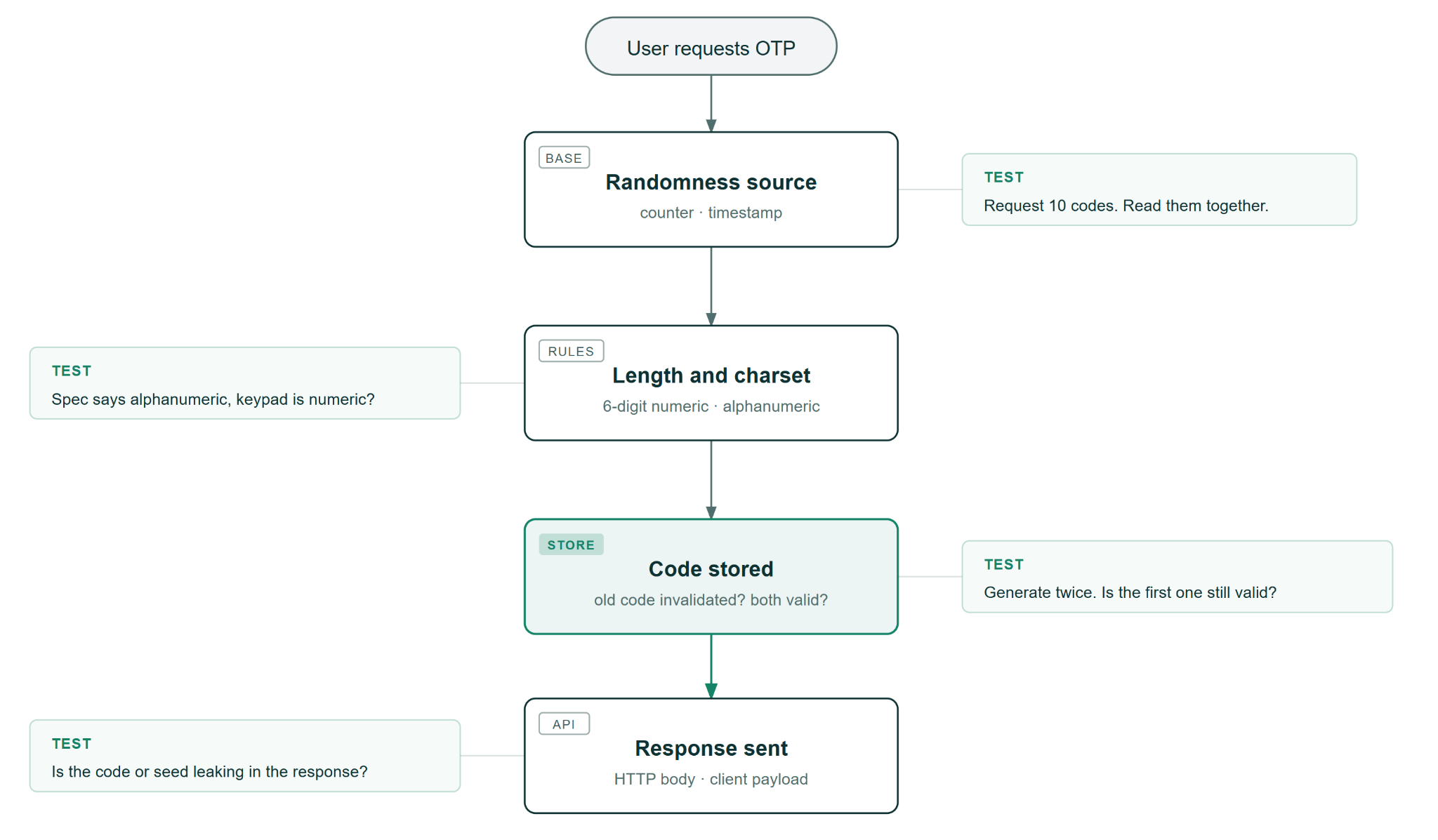
Fig 2: Four places where generation can go wrong
Delivery
Does the code reach the right person, and does it arrive in time to be used?
Once the OTP code is generated and exists, it has to travel across at least four boundaries:
- From app to the auth service
- From the auth service to the SMS gateway (country-dependent)
- From the SMS gateway to the carrier or mail server
- And, finally, from the carrier to the user's device
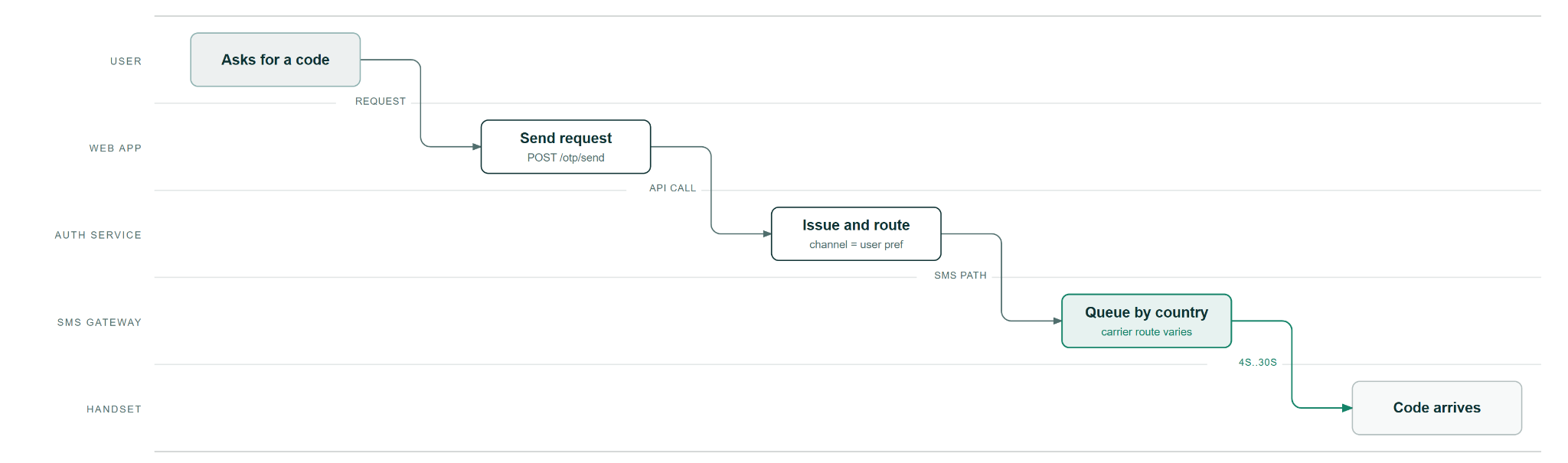
Fig 3: Four boundaries that the OTP touches before reaching you
Each of these handoffs is a risk area where the code can leak, slow down, or arrive through the wrong channel.
Here are a few deeper test scenarios for the delivery stage:
Check the channel against the user's setting. If a user registered with a phone number but also has an email in the database. If they click "send code," can the system route it to email in case SMS sending fails for some reason?
In such a case, the user is left staring at their phone or confused about why they are getting a code in their email. So, test for behaviour when the primary delivery channel fails?
Put a timer on it. Start a timer the moment you click "send," and stop it when the message arrives. Do this five to ten times for a mean time to delivery.
In such a case, some deliveries take up more than half your expiry window. Users in weaker network areas will time out every single time. A 40-second OTP delivery against a 60-second expiry is a ticking time bomb in production.
Read the full message body. Copy-paste the entire SMS or email text and proofread every word for clarity, accessibility, and readability. I recently saw a Reddit post about a vibe-coded app where the OTP message said "Your verification code for account ending in xx-{account-id} is 4524." That hands an interceptor the account identity and the exact action they can take with the code.
Break the network in the delivery journey. Turn on airplane mode on your device, trigger the OTP, wait 30 seconds, and turn airplane mode off. Now check that:
- Did the OTP arrive?
- Did the app start a fresh timer?
- Does the app allow an additional waiting timer? (after the timer expires).
- Does the system just display "code sent" and start the timer on the client side?
- Does the timer actually start when the message actually leaves the SMS gateway?
Verification
Does the system know whose code this is, and how many guesses it allows?
Once the OTP code has landed on the user’s end and the user has entered it in the app interface, the authentication system has to verify it. This is where most security risk lies, and this stage still has the fewest tests.
It’s important to check whether the system knows who the code belongs to, how many guesses it allows, and what it reveals to an attacker in case something goes wrong.
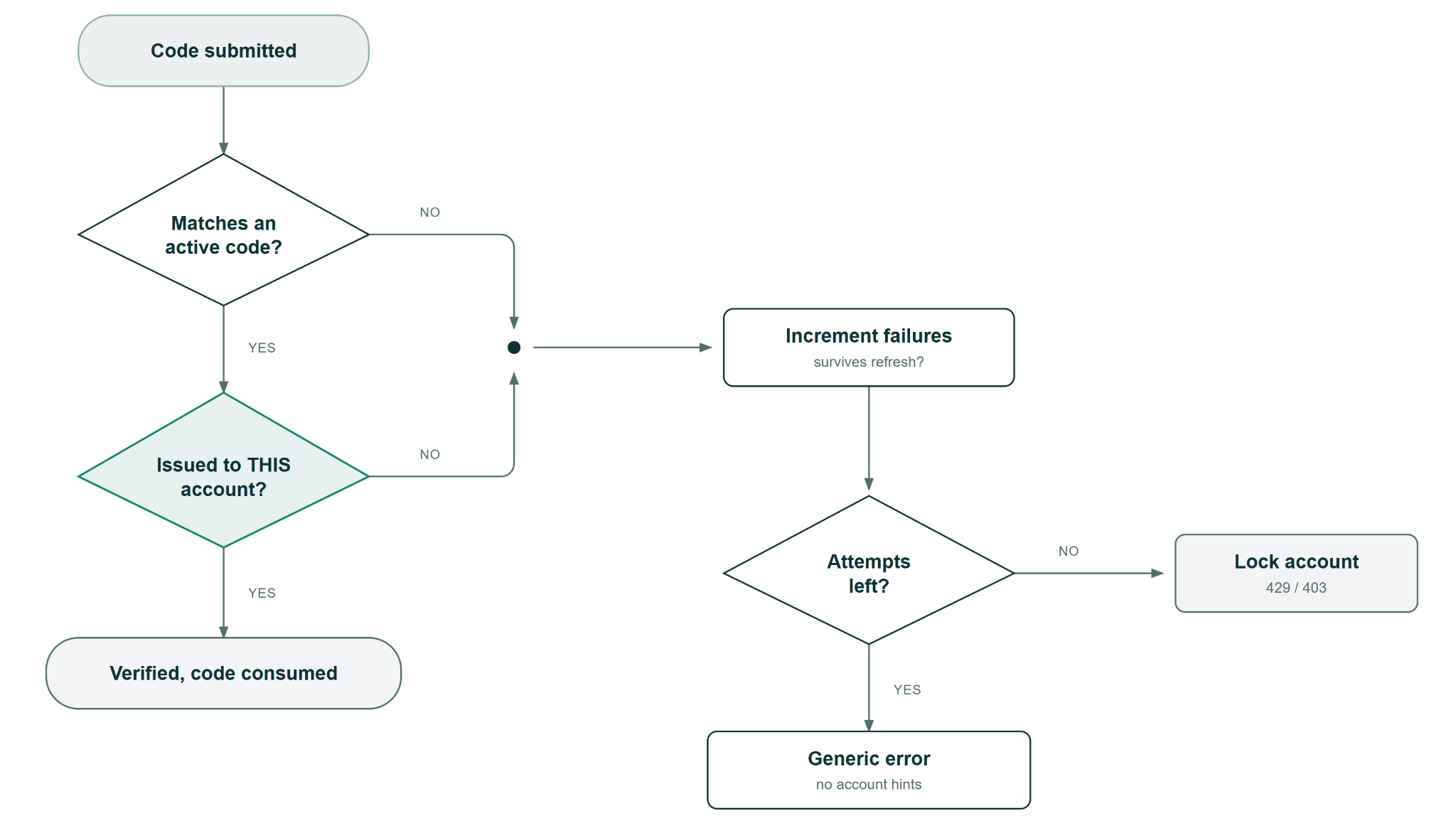
Fig 4: Verification stage workflow
Here are a few deeper test scenarios to cover essential checks for the verification stage:
Fail on purpose, and fail repeatedly. This is pure invalidation testing. Enter 000000 or any random code five times. Does the system lock you out after 3 attempts? After 5? After 10? Or Never? Try doing a brute-force attack if the system allows. Also try to refresh the page and retry. If the counter resets on refresh, any attacker can write a script that submits a guess, clears cookies, and loops forever.
Read the rejection message. The rejection message should not give away too much information. "Invalid code" is fine. "Invalid code for rahul@wonderproxy.com" tells an attacker the account exists. Also, try to submit a valid-format code against an account you know doesn't exist. Compare the error message word for word with the one you get from a real account. If they differ ("no account found" vs. "invalid code"), you're vulnerable to exposing critical business data to an attacker.
Double-click submit. Enter the correct code and click submit twice quickly with your browser's network tab open. If both requests return a 200 OK, this means that the front end allows sending the submit code request twice. This should be restricted.
Expiry
Does the system know the difference between too old and already used?
Expiry is one of two ways a code dies. OTP expiry is a time-based phenomenon. The code has a set validity period, and once that time passes, the code is unusable whether or not you have used it.
Whereas, OTP consumption is an event-based phenomenon. If the code was used successfully, the system marks it as spent.
Both end in the same place. The timer can only answer "is this code too old?" It does not answer "has this code already been used?"
So this section covers time-based and the state change together. Expiry is what most of the teams remember.
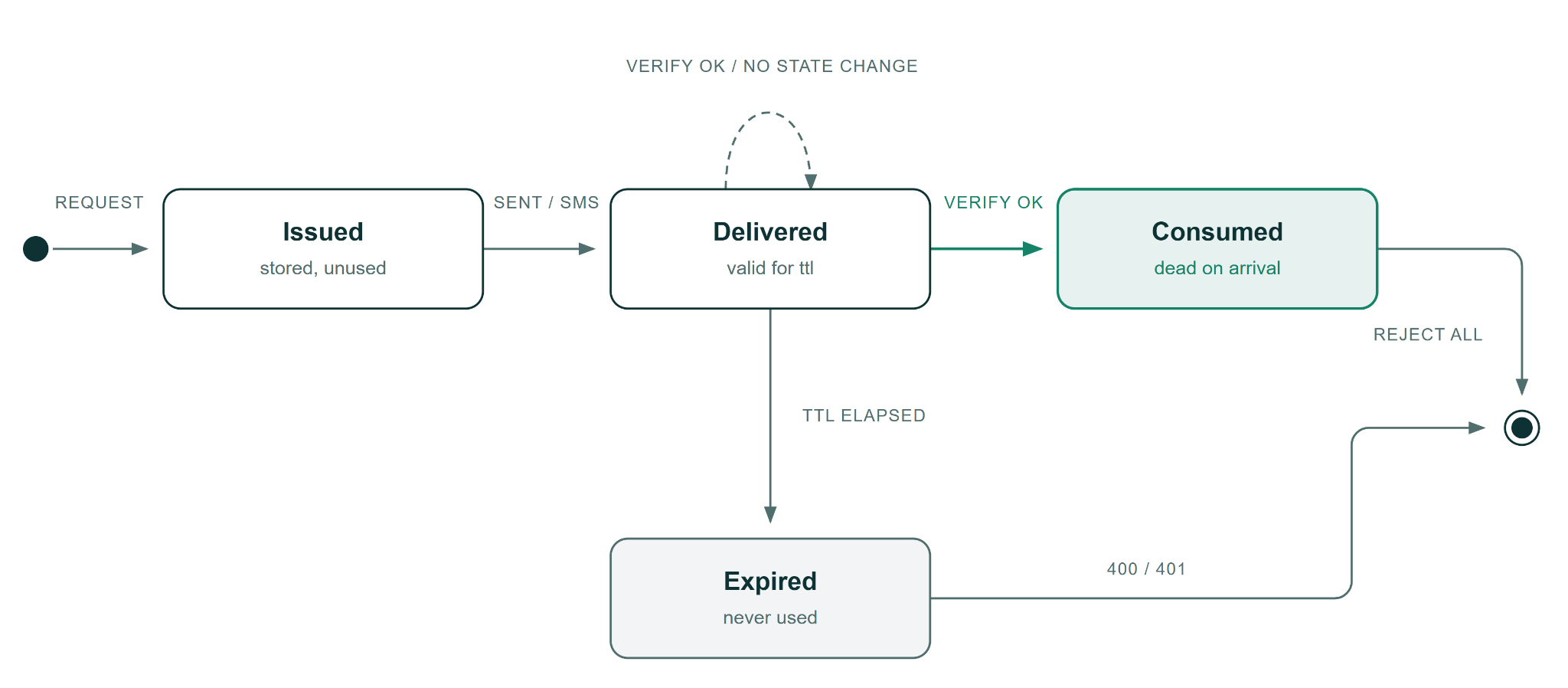
Fig 5: Expiry workflow - expired vs consumed state.
Here are a few deeper test scenarios to cover essential checks for the expiry workflow:
Use a code successfully, then use it again inside the validity window. Verify with a valid code, note the time, then paste the same code into the same form within 60 seconds or the timeout duration. If the system lets you through again, the code was never marked as consumed. Anyone who intercepted the code had minutes to reuse it.
Issue a new code and try the old one. Request code A, don't use it, request code B. Now submit code A. If code A still works, the system is accepting valid codes instead of replacing them. You would have already seen this behaviour in many in-production apps already. This is a security vulnerability. Any attacker who can grab an earlier code can break through into your system now.
Hit the browser back button after a successful verification and resubmit. Complete your OTP flow, land on the application, now click back, and hit submit again. This is the famous navigation heuristic of testing. If the form resubmits and the server accepts it, the code was never invalidated on first use. Some apps cache the POST data, so the browser replays the exact request.
Let a code expire, then submit it. Wait for the full expiry window to pass (usually 60 to 180 seconds), then submit the expired code. The screen might say "code expired," but check the HTTP response. A 200 with an error message in the body gives weaker safety than a proper 401 or 410. Oftentimes, the downstream systems parse the status code, not the message.
There's a post on our wonderproxy blog about exactly this failure. An insurance claim app checked whether the code had expired but never checked whether it had already been used.
Replay and Geography
Is the code tied to the person, the device, and the country it was issued to?
Everything up to this point assumes one user, one browser, one network. Your customers as well as the attackers don't work that way. Replay testing checks what happens when the same code crosses session boundaries, device boundaries, and even geographic boundaries covered in the next section.
This stage separates "we tested the OTP" from "we tested the OTP under conditions that look like real usage".
Here are a few deeper test scenarios to cover checks for the replay and geography use case:
Same code, two browser sessions. Complete OTP verification in Chrome, copy the code, open an incognito window, paste it into the same form. If the code works again, the system validated it against a global store with no session binding. An attacker with the code doesn't need your cookies.
Same code, two devices. Verify the code on your laptop, then immediately enter it on your phone. Different device fingerprints, different IP (if the phone is on cellular or choose a different wifi network), different session. If both succeed, it proves that the system has no device-level scoping at all.
Same code, different country. Try verifying a code from an IP in Germany that was issued to a session originating in India. Does the system flag it? Does it let it through without a word? Risk notifications that trigger on a new device or unfamiliar browser sometimes ignore the geographic mismatch entirely.
That last one is the test most teams simply cannot run unless you use a proxy platform like WonderProxy.
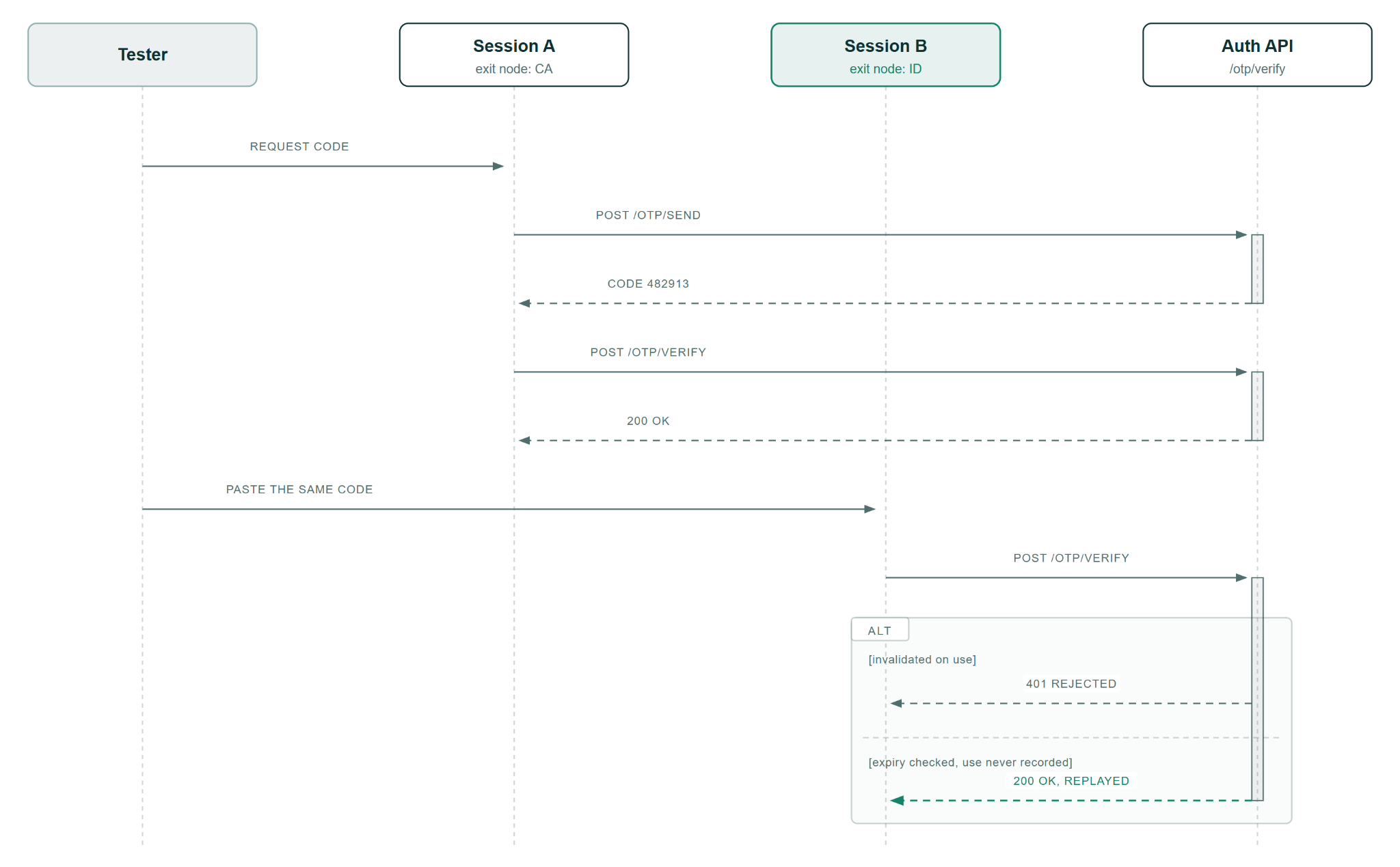
Fig 6: Replay workflow: One code, two sessions, two countries.
Geography factors change OTP testing
International platforms run a different OTP flow in every country they serve. SMS routing and latency change with the carrier, and they change again at every border. A code that lands in 4 seconds from the UK can take 30 seconds from India, and that turns a 60-second expiry into a support ticket.
Slow delivery is the risk you can feel. The real risk is what most people usually don’t pay any attention to. If verification never checks where the request came from, location stops working as a signal at all. A code issued to a session in the UK gets accepted from a server in Germany, and nothing in the logs objects. An attacker holding a stolen code can then work from anywhere on earth, at any hour, and your risk engine will never report it.
It’s simply not possible to see any of that from a desk in one city. WonderProxy gives you real endpoints in 100+ countries, so your request starts where your customer is.
That matters more now that AI agents run the tests. An agent working from one location tests one version of your product, over and over. Point it through regional endpoints, and it runs the checks it could never reach before, at a scale you can't match manually.
Summary
Five stages, and five questions.
- Can you trust the code before it ever leaves your system?
- Does the code reach the right person, and does it arrive in time to be used?
- Does the system know whose code this is, and how many guesses it allows?
- Does the system know the difference between too old and already used?
- Is the code tied to the person, the device, and the country it was issued to?
Most teams answer the first two or three and stop there. The bugs that go into production usually come from avoiding the last two questions. A timer is easy to build, and a state change is easy to forget. A test that always leaves from one desk in one city can never fail the geography check.
Take the 5 stages above and run them against your own product. If stage 5 stops you because every test you run leaves from one IP in one country, that's the gap worth closing.
Start a WonderProxy trial and run the geography tests before your next release.