How to do localisation testing: Part 1: How to test translated text when you don't speak the language
I could find real bugs against the German build in 40 seconds without reading a single word of German. Want to know how? Well, read on, and I'll tell you. I'll share techniques and ways to test in languages you don't know.
I opened my application at 360px wide and looked at the “Zahlungsmethode ändern” button. The button showed only “Zahlungsmethode”. The second word, “ändern”, was not visible. The German label was a little wider than the button. The second word moved to a second line, and the button's fixed height hid that line. The English labels had almost the same number of characters. But the button had space only for the English label. In most cases, when English words fit the buttons, German words didn't.
That was a layout bug. This bug is clipped text. The label needs more space than the button has. Most problems in a translated app fall into this category. You can find all of these problems yourself even without knowing the language you are testing in.
Most testers don't attempt localization tests because they do not know the other language. This article shows you how to do these tests. You'll learn methods to find real bugs in a language you cannot speak or understand.
Not knowing the language limits your ability to know: “Is this the right word?” However, it doesn’t limit you from testing for things like:
- Does the text fit?
- Do the characters render?
- Does the formatting change?
- Is the text in the target language at all?
To test translated text, knowing the language always helps, and you'll eventually want a native speaker for final checks. Until then, you can still do a lot of testing and draw a clear line between what you can produce yourself and what you need from a native speaker.
Before you read the checklists and ideas mentioned below, you must know one fact. Localization is a legal, technical, and cultural challenge. So, you will have to treat localization as more than a replacement of strings. Doing it well protects your brand as well as helps you establish it in new territories.
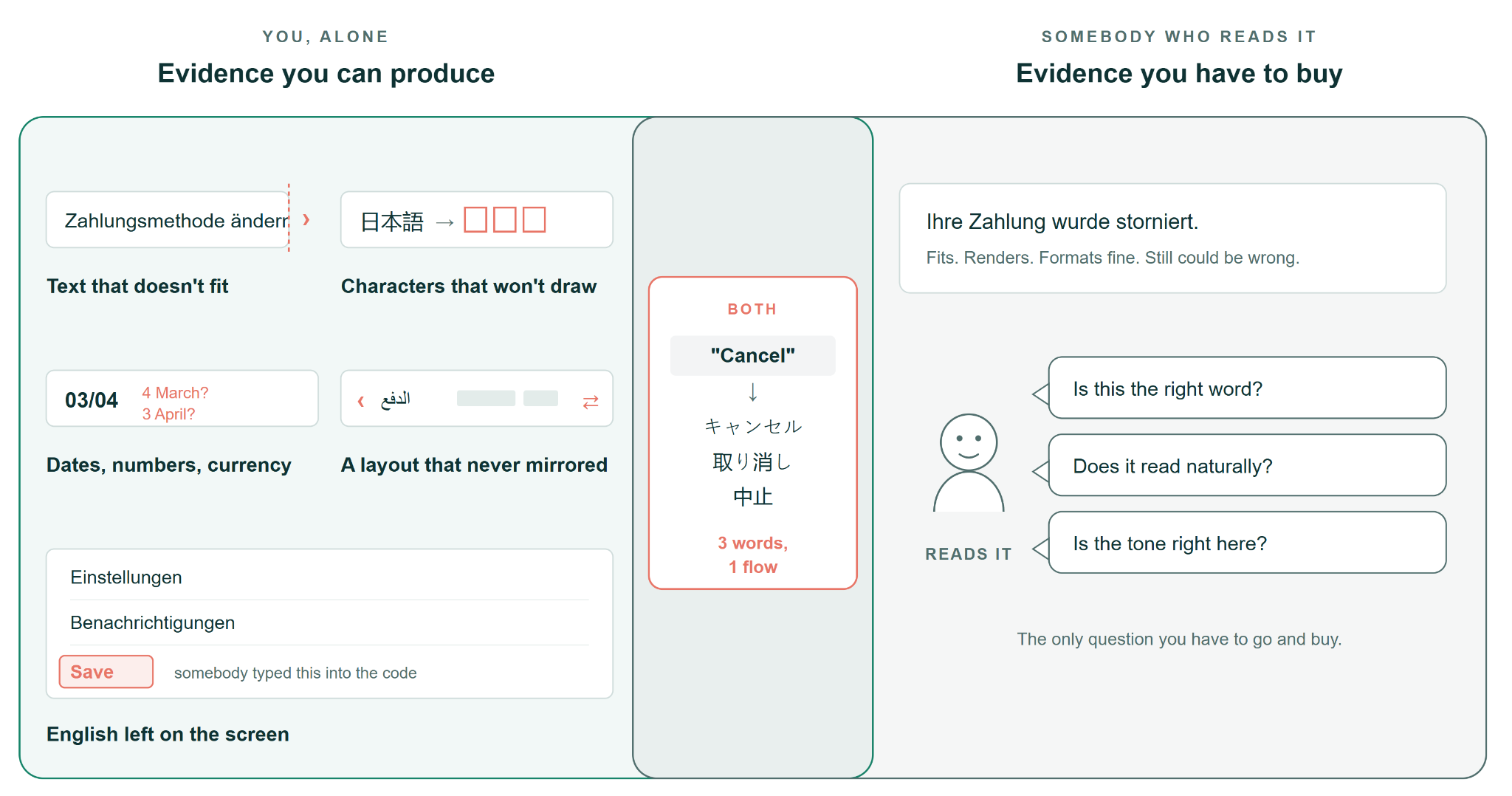
Fig 1: What you can test yourself vs. what requires a native human reader.
Now, we will look at 3 ways you can test translated text when you don’t speak the language.
You do not need to speak the language to find important bugs. You need your eyes, your tools, and your test skills. Layout, dates, numbers, currency, and text direction do not need translation. You can easily spot many bugs in these areas in a few minutes. A language expert can review the meaning of the words later. You can do the rest now.
Break the screen without reading it
You do not need to understand a sentence to see that it is broken. A translated screen shows its bugs in its shape, and not just in its literal meaning. Text that does not fit, missing characters, and numbers in the wrong format are visible to all testers. Your eyes find these bugs faster than a translator does.
The checks below can catch most translation bugs. You just have to:
- Open the app in the target locale.
- Use a small screen (eg. 360px) or a lower-resolution device
- Observe each screen as a picture.
Start with the screens that users see most: login, checkout, and error messages. Write down each bug when you find it, with a screenshot along with the category mentioned below:
- English on a German (or localized) screen. All English text on a German screen is a hardcoded literal. A developer typed the word into the component without using a key. You only need to recognize five words to find this bug.
- Programming variables on the screen. If the checkout.button.pay shows on a button, the lookup failed, and the fallback showed the key. An empty label with a click target that works is also a similar bug.
- Placeholders that did not fill. Check if %s, {0}, {{count}} show on the screen as raw text. Also look for the opposite bug. A German string can lose the {name} token. The welcome message shows, but the user's name disappears.
- Clipped text. Text length varies from language to language. Here are some rough guides. German text can be about 30% longer than English text. French text 20% longer, and Spanish text 25% longer. Chinese text 30% shorter. Short text also breaks layouts, and a button can look unfinished. Do the test at 360px, not on a large 4K developer monitor.
- Tofu. Empty rectangles (Eg. □ ∷) show where a character must be. The font lacks the glyph. This bug appears first in Vietnamese stacked diacritics, Devanagari (Hindi) conjuncts, and all characters after the Latin-1 range.
- Direction. Arabic, Hebrew, Urdu, and Persian go from right to left. The full layout must be a mirror image: navigation, back arrows, progress bars, sliders, and breadcrumbs. Chinese goes from left to right. Many test plans specify the wrong direction for Chinese. Review your test plan before copying someone else's mistake.
- Formats that did not change. 03/04 is two different days. 1.000,50 and 1,000.50 are the same amount of money in two different country formats. Also examine the currency position, the thousands separator, the name order, the address order, the phone format, and the first day of the week.
- Sorting order and letter casing. Turkish has a dotless i. If the app changes İstanbul to lowercase in a Turkish locale, a comparison with istanbul fails. This failure can break a login or a search. German ä has 2 different sort positions. A dictionary rule and a phone-book rule put ä in different positions.
You can write each of these bug reports alone, with a screenshot and a list of steps. So far, you don't need a translator or to wait for a language reviewer.
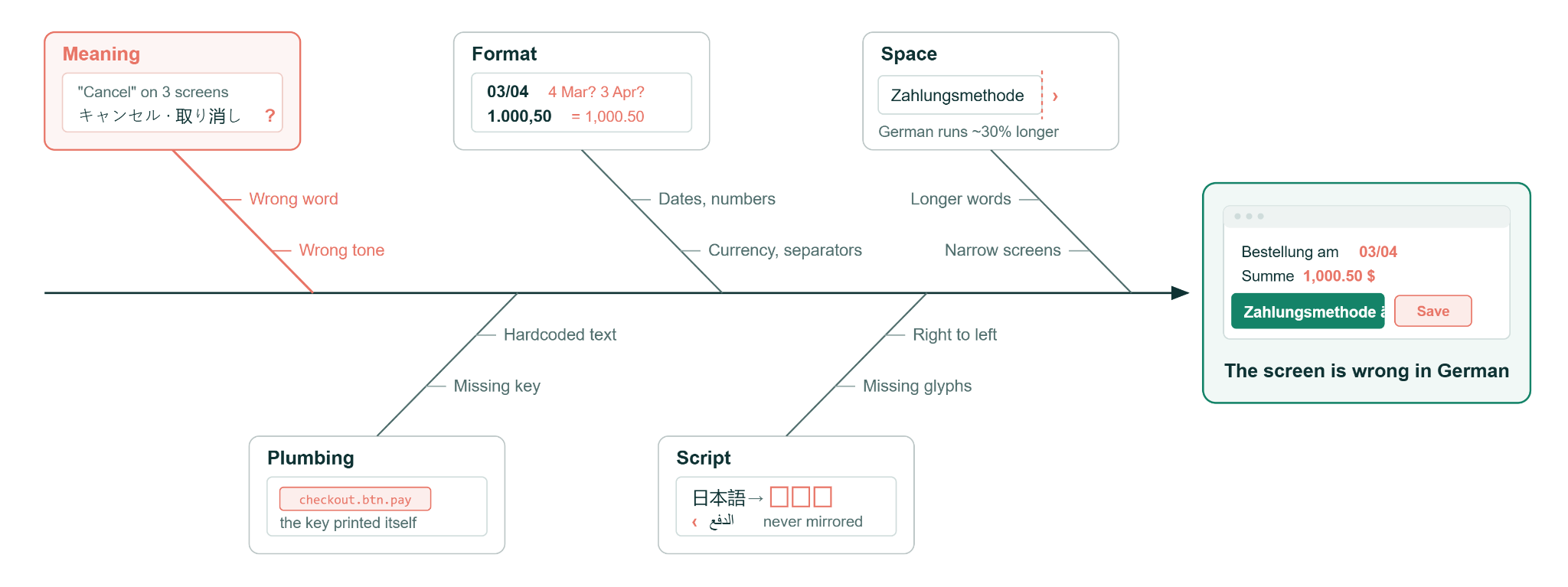
Fig 2: Localization defects originate from multiple sources.
Make the app contradict itself
Your strongest method is to make the app disagree with itself.
Look at the Japanese word for “Cancel.” You cannot examine if this word is correct. But you can show that the app uses 3 different Japanese words for “Cancel” on 3 screens in 1 flow. That is an inconsistency (aka contradiction) defect.
- Group the file by source string. Get the localization file and group the strings by the English source. Look for 1 source that has more than 1 target. A 20-line script does this task. The script finds inconsistent translations across thousands of strings at the same time.
- Do the reverse search. Look for more than 1 English source with the same target. This failure is worse. If “Delete” and “Remove” translate to the same string, a user can delete an account when they meant to remove a saved card.
- Stress test the session. Change the language to German (or any other locale). Then navigate, refresh, log out, and log in again. Open a deep link, tap a push notification, and open a second tab. Does the language stay German in all 7 places?
- Change the language in the middle of a flow. Change the language halfway through a checkout. Read the confirmation screen. Then read the confirmation email. Different services with different locale defaults usually send these 2 items. Nobody examines the email.
- Do a round trip. Change to German, do the core flow, and then change back to English. Keep the console and the network tab open for the full time. If a locale change returns a 500 error on 1 endpoint, the problem is not a translation problem now.
- Make a screenshot of each route. Set Playwright to open each route in each supported locale and save an image. Put the 2 images of the same route in 2 locales side by side. You do not need to read a word to see clipped text and layout drift. The images will give you a regression baseline.
You do not need to know if a translation is correct to prove that the app is inconsistent. An app that uses 2 words for 1 action, or 1 word for 2 actions, has a defect in all languages. A session that loses the language, or an email in the wrong language, is a defect that all users see.
Each test in this section gives you evidence: a script output, a screenshot, or a network log. With this evidence, your bug report does not depend on your opinion. The app shows the problem itself.
Spend 20 minutes of a native speaker's time
At some point, you will need a native speaker. The skill is to use less of their time and not involve them for days. Usually, if you are in an international company, a native speaker already works in it.
- Local sales and support. These teams read your product in that language each workday. They already keep a list of complaints. Always start with these teams.
- Marketing. Marketing wrote the English source and owns the brand nouns. Marketing cares most about the words that must not be translated.
- The documentation team. This team has a terminology list. Nobody may have told you about this list.
- Your translation vendor. The contract frequently includes a review. Many teams pay for the review and do not ask for it.
- A real linguist. Use a linguist if your budget is large enough and translation bugs are a big business risk.
Give the reviewer 20 strings in a ranked list. Put the English source next to each target, and add a screenshot that shows where each string appears. If you ask a person to “review the German app,” you will wait 2 weeks and get no result.
Ask 3 questions for each string:
- Is the string appropriate here?
- Does the string fit the context?
- Is the grammar correct?
Before the review starts, give the reviewer the do-not-translate list. This list includes product names, legal entity names, and the feature names that your support team says aloud on calls. A correct translation of a brand name is still a bug.
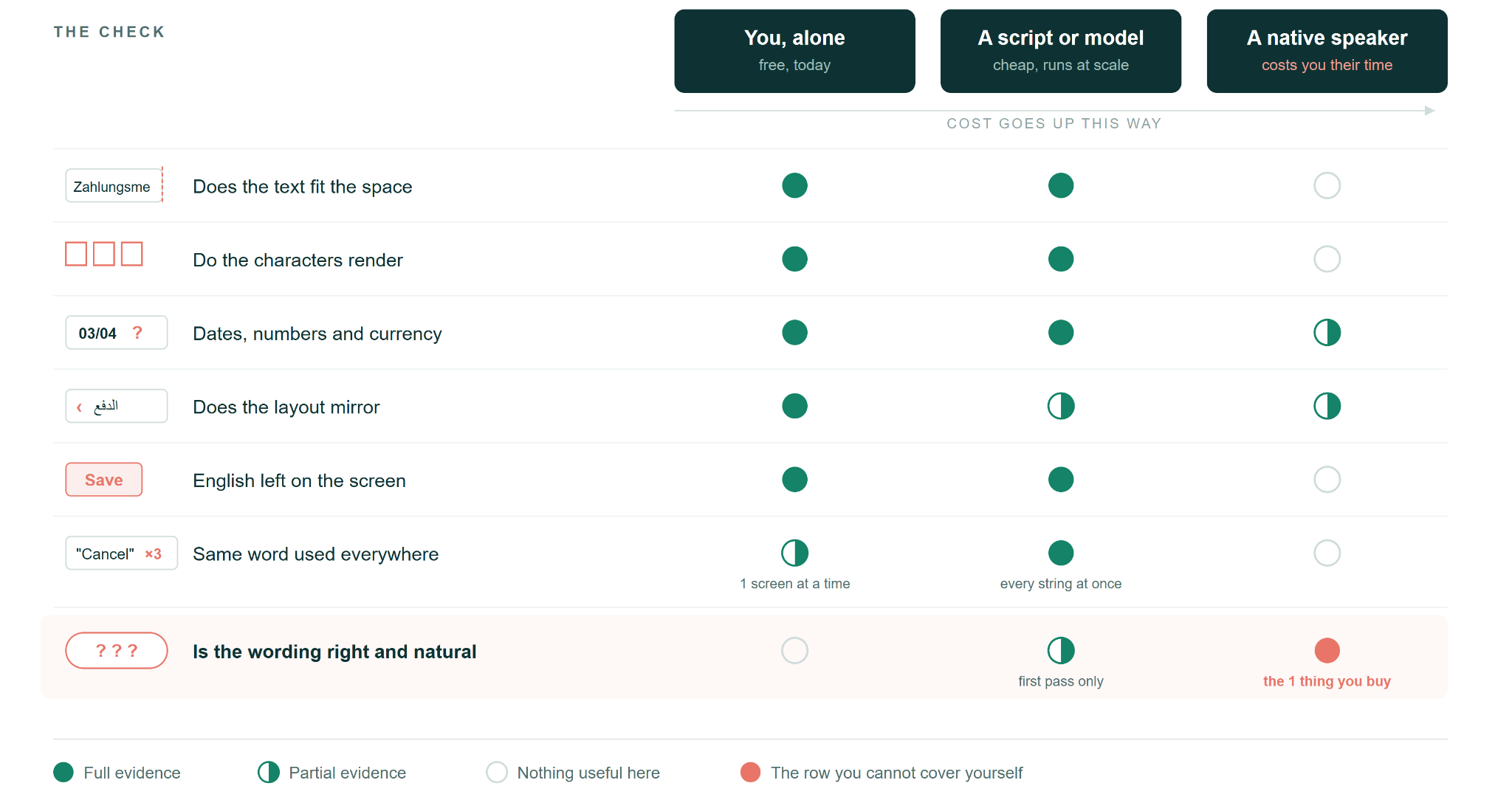
Fig 3: Localization checks - what you can test, automate, and what needs a native speaker
Start this week
A translated app breaks in five areas: space, script, format, delivery, and meaning. You can prove four of these five areas yourself. Write those bug reports now. Do not wait for a reviewer to permit you. The fifth area, meaning, needs a person who can read the language. Make the list small, 20 strings, and give the list to that person with the evidence.
All of the tests in this article run from one location: your desk. Your users are in other countries. The app can show them a different language, currency, or legal text.
The next part, “How to do localisation testing: Part 2: Advanced localization testing”, goes deeper. It shows how a string reaches the screen and how pseudolocalization and AI tools help. It also shows how to do your tests from the location of your user with WonderProxy.
Start a WonderProxy trial and run these tests from the countries where you sell your product.