How to test a hotfix
Testing a hotfix is a real test of your skills as a quality professional. A hotfix usually comes with a little bit of urgency. Something is broken in production, someone found the problem, the developer made the changes, and now we need to know whether we can safely ship it.
Here, a tester has to make a trade off with the time available, but without losing quality or confidence. We generally don't have the luxury of time to explore everything. But that doesn't mean we should only test the exact steps from the bug report and call it done.
A hotfix is not the time to test everything. It is the time to understand the change well enough to know where your testing effort matters. I usually think about it as a loop. Start with the problem, understand the change, follow where that change can travel, test the things most likely to be affected, and then ask whether I have enough evidence to release it. If something doesn't make sense along the way, I go back and investigate the change again.
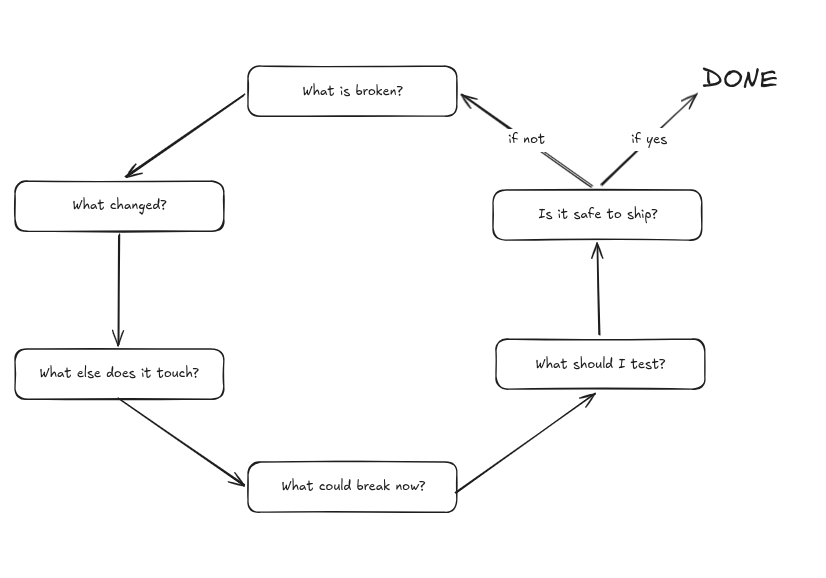
A flowchart showing the hotfix testing process
Start with the problem
The first thing to do is to reproduce the problem.
I follow the reproduction steps exactly as they were reported. Does the problem happen? Does it happen every time? Is there something specific about the user, data, browser, permissions or state that makes it happen?
A bug report usually tells me what someone observed, not necessarily what is actually broken. If a report says the upload is failing, I can ask several questions. Which upload? What type of file? Which user? At what point does it fail? Does the request fail? Does the backend reject it? Does the upload succeed but the UI show an error?
Once I reproduce a problem, I have much more information than a ticket description. I have a behaviour that I can compare before and after the fix.
Understand what changed
Now I want to look at the change.
This is where I find a quick code review useful. I’m not trying to review the code like a developer and decide whether it is beautifully written. I’m trying to understand what the developer actually changed and where the change is affecting.
If a developer changed one function, where else is that function being used?- If they changed a database query, what other flows depend on it? If they changed a validation rule, where else is that validation being used? If they changed an API response, who consumes that response? The developer fixes the reported problem, but the thing they changed wasn't only used by that one flow and is used in other places. The fix works perfectly for the reported scenario, while another flow that depended on the old behaviour quietly breaks.
I usually find the most bugs through this part of hot-fix testing. It isn't just the tester working against time. The whole team is in a hurry to get the problem sorted, and that increases the chances of someone making a change that fixes one thing while quietly affecting something else.
So, my question changes from “What should I test?” to “Where else does this change travel?”
Find the blast radius
Once I understand where the changes go, I can decide how much testing I actually need.
Suppose the bug was in one particular flow, but the developer changed a shared function that is used in five other places. I don’t need to suddenly run the entire regression suite. I need to look at those five places and decide which ones are likely to be affected.
If a query changes, I'd look at the different ways its result is used. If validation is changed, I would look at the values around that validation. If a permission check changes, I would think about the different permission states around it.
This is what makes hot-fix testing different from simply following a regression checklist. The scope of testing should come from the change.
A checklist tells me what I tested last time. Understanding the change tells me what I should test this time.
Now test the original problem again
At first, I would run the original reproduction steps (never miss this). Does the problem still happen?
If it doesn’t, the reported issue is resolved. But don’t stop there because there is a difference between fixing the example and fixing the problem. Let’s say the original bug happened with a 10MB file. I would not just upload that same 10MB file again. Rather, I would try slightly smaller or larger files. Or different file types, and try another user, if those things are relevant to the changes.
The idea isn't to create 50 more test cases, but to understand whether the fix handles the condition that caused the problem or only makes the exact reproduction steps pass.
Test around the change
Once the original problem is fixed, I want to test the behaviour around the change. This is where the earlier code review becomes useful again.
If the developer changed a condition, what happens just before and after that condition? If they changed a shared function, what happens in the other places that use it? If they changed one state of a workflow, what happens when the user enters that workflow from another state?
I don’t need to explore in every possible direction. I just need to follow the path of changes that could create meaningful risk. This is where I would look for things that are easy to miss because they aren’t part of the original bug.
- Does an existing flow still work?
- Does the same operation still work for a different type of user?
- Does the old data still behave correctly?
- Does the error handling still make sense?
- Does the fix introduce a new failure when the original condition isn’t present?
The change should tell me where these questions are worth asking.
How much testing is enough?
This is probably the hardest part of testing a hotfix. There’s always a temptation to go in one of the two directions. Either we test only the reported bug because “it’s a hotfix”, or we try to run everything because anything could break.
Trust me, neither is particularly useful. The amount of testing should depend on the risk involved. I consider a few things for this:
- User impact: How many users could be affected if this goes wrong? Does it affect a critical user journey or a less frequently used feature?
- Business impact: Could the issue affect customer data, payments, security or any part of business operation?
- Complexity of the change: Is this a small, isolated change or does it touch shared functions, APIs, database queries or multiple workflows?
- Existing confidence: Do we already have automated tests covering the affected areas? Have those tests passed after the change?
These factors help me decide where to spend my limited time testing. A small change in a critical permission check might deserve more attention than a much larger change in an isolated UI component. Automation can add confidence to your test which exercises the behaviour that could be affected by the hotfix.
After all this, there is one question I ultimately care about during testing a hotfix:
Do I have enough evidence to justify releasing the fix?
The answer depends on more than whether the original bug is fixed. I need to consider the risk factors. How severe the original issue was, potential impacts, what happens if we don't fix it and what the consequences could be if the fix doesn't work or introduces another problem. A hotfix for a minor UI issue carries a different level of risk than one involving data integrity, security, or a critical business operation. The amount of confidence I need before releasing them shouldn't be the same either.
There is no way to prove that nothing else can break. What I can do is understand the risks, gather evidence around the change, and make a release decision based on the consequences we're willing to accept rather than simply hoping everything works.
To sum up
Hotfix testing isn’t about running a smaller version of your regression test suite. It’s about understanding the change, identifying the potential impact and then deciding where testing effort matters. In other words, identify what evidence you need to make a sensible release decision.
Start by reproducing the problem. Understand the fix. Follow the blast radius of the change and focus your testing effort where risk is highest. Verifying that the original issue is resolved is only the first step. Then you need to test the areas most likely to be affected by the fix. That testing should depend on its impact on users and the business, the complexity of the change and its potential to add new bugs. Existing automation can add confidence, but it doesn't replace understanding what has changed and what could be affected.
Ultimately, the goal isn't to test everything. It's to gather enough relevant evidence to make an informed release decision. That’s what makes hotfix testing a change-based assessment rather than a quick rush test.