How to do localisation testing: Part 2: Advanced localization testing
This article is the second in a 2-part series. The first article, “How to do localisation testing: Part 1: How to test translated text when you don't speak the language”, covers the basics. Read that article first if you haven't already.
The first article focuses on what you see on the screen. You look for clipped text, missing characters, incorrect formats, and inconsistent wording. This article goes deeper into three areas:
- How a string gets from the language file to the screen.
- How pseudolocalization, translation tools, and AI tools read the text for you.
- How the location of the user changes the language the app shows.
You still do not need to speak the language to use these methods.
Check how the string gets on screen
Before you begin your first test, ask your developer this one question:
“How does a German (or other language) string reach that button?”
Most likely, you'll get one of the three answers. Each answer has a different type of failure:
- Bundled. Mobile apps keep the strings inside the binary. A screen asks for a key. The bundle gives back a string. If a key is missing, the store release has the missing key. Only a new release can correct the problem.
- Fetched. Web apps get the string in the response. The app puts the string into a placeholder. If a key is missing, the failure occurs live on the client side, in front of a user. The server logs can show no record of this failure.
- Cached. The CDN (Content Delivery Network) keeps a copy of the full localized page. The first visitor from a location sets the page for that location. All subsequent visitors see the same page.
Each answer needs a different test. You cannot fix a bundled app on the day that you spot the bug. For this reason, it’s important to test a bundled app earlier and more rigorously. A cached page, on the other hand, needs two requests from different locations before you can see the bug.
Then ask your developers for some basic testability features while they are cheap to make:
- A method to change the application location. Ideally, this should be a software switch and must not require a change to your account, device, or SIM.
- Access to the localization files. These files are the .json, .resx, .strings, or .po files that hold all of the strings.
- A translation map that you can diff between builds. With this map, you can see the changes without opening 40 screens.
If you ask for these features after the team makes the build, you are now asking for a favor and additional work from your team. However, if you ask for it in the design meeting, you can set it as a requirement.
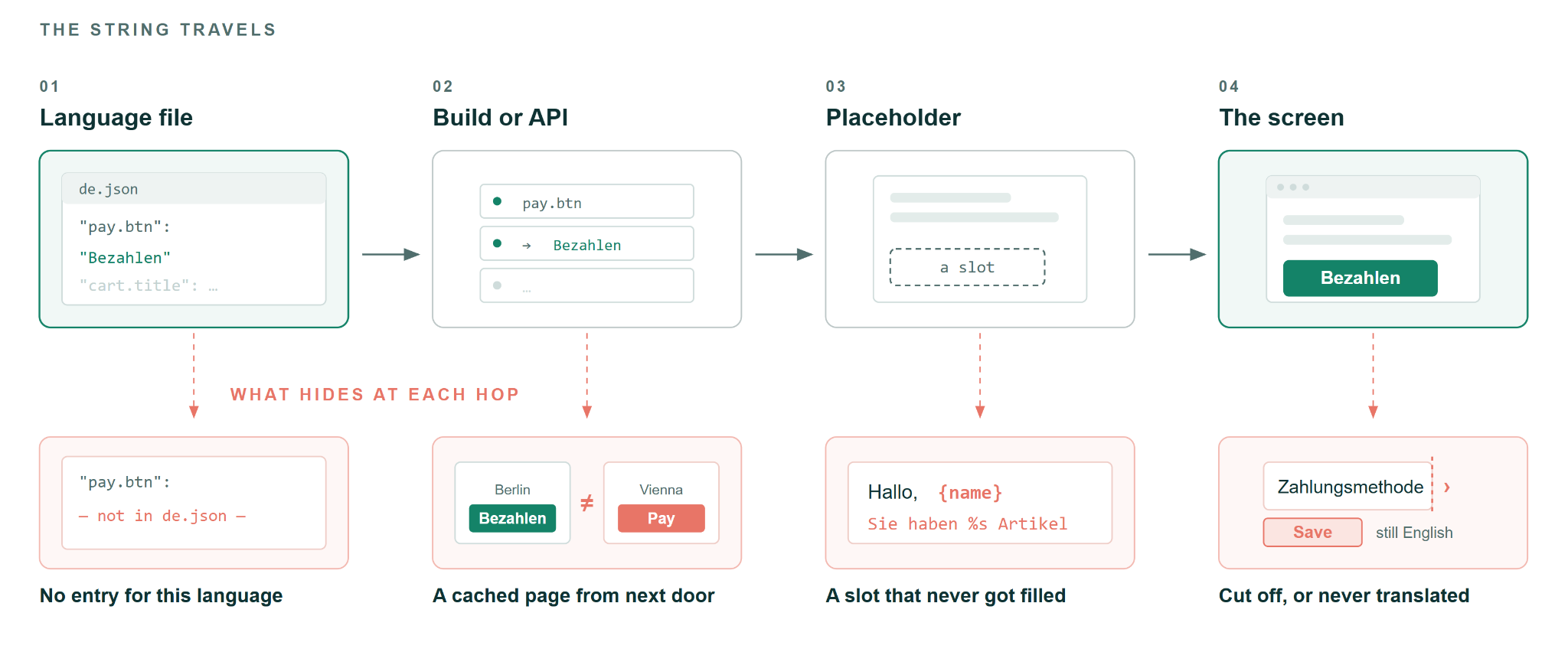
Fig 1: Strings can break at every step between the language file and the screen.
Let a machine or AI assist you
Use the translation tools and the AI tools in this section as a first pass only. They find obvious mistranslations and inconsistencies. A run once for each release is easy. Running a full regression suite each night quickly becomes expensive. These tools are also weakest on the languages where your company has the least help. Low-resource languages have little training data.
Start with pseudolocalization. Most testers don't know this method, but it's simple and popular, and it's also used to test the Windows platform and the famous MS Office suite.
Pseudolocalization is a fake translation that the build makes automatically. It does not change the text's meaning. It changes the shape of the text so it looks like a foreign language. Pseudolocalization does 3 things to each string.
- It replaces source characters with similar-looking accented characters.
- It makes the string longer, like a real translation.
- It puts brackets around the string, so you can see where each string starts and ends. Example: Edit becomes [!!! Éðît !!!].
You can still read the result, but the app now acts as if it shows a foreign language. Pseudolocalization is free, and it can run before you pay a translator.
This step gives you 2 findings before a translator opens a file. If you can read a string as plain English, the string is hardcoded. Nobody will translate it. If a string clips with 30% padding, it will clip more in real German or other languages that take up a little more space than English.
Add 30 to 40% padding. German text adds about the same length. Tools such as SimpleLocalize and Crowdin both supply pseudolocalization as a pipeline step. Microsoft Windows also has pseudo locales (qps-ploc), and they are not new.
Now use the tools that read for you:
- Back translation with a glossary. Translate the German back to English and read the result. Without a glossary, the result is very noisy. With a glossary, the result is useful. The glossary locks the product nouns and the legal terms. Then all changes in the result come from the translation, not from the tool. I use DeepL instead of a raw translate call because DeepL supports glossaries.
- A local model, when the strings must stay in your network. Google released TranslateGemma in January 2026 in 4B, 12B, and 27B sizes. Google trained the model on 55 language pairs. The 4B model runs on a laptop. This is important if you are working on a regulated product or industry.
- LLM review passes. Give the model the English source and the target. Then ask narrow questions:
- Does this German sentence preserve the meaning of the source?
- Would a native speaker read this as natural, or as machine output?
- Can this text mislead a user in a consent dialogue or a payment confirmation?
Put most of your effort on the third question. A clumsy translation on a settings page costs you nothing. A misleading translation on a consent screen can get you in front of a regulator.
Playwright and Browser DevTools do the locale changes. Playwright sets locale and timezoneId on the browser context, so the suite runs in a locale without you touching your OS settings. Browser DevTools shows the rest: rendered strings, storage, network traffic, and the requests that the app sent to the server.
Go the extra mile: Test from where your user really is
All the previous methods need one condition. The correct language file must reach the browser or mobile app first.
Your app makes a guess. It reads 5 signals:
- IP address of the request
- Accept-Language header the browser sends
- Country tag the CDN stamps on
- Country stored on the account
- Domain that got typed.
Then the code selects one signal. Usually, nobody writes down this priority order. Ask your developers. “Which signal has the highest priority in your app?”
The most expensive form of this problem is the regional variant. fr-CA and fr-FR are both French. pt-BR and pt-PT are both Portuguese. es-MX and es-ES are both Spanish. The words and currency differ. In some markets, the legal text is also different. A Montreal user served in Paris French gets an e-mail where they expect courriel. The user also sees a euro and not a dollar.
From your desk, you can make only 1 combination of signals. If you change your browser language, you change one of five signals. The other four signals still show your actual location.
WonderProxy sends the request from the location of your user. It has 281 locations in 103 countries. The IP address belongs to a network in that country. Thus, the geolocation lookup, the CDN country tag, and the language negotiation all see a real location. They do not see a setting that you changed.
WonderProxy also works with Playwright. The screenshot crawler from the first article needs this small function to test with WonderProxy.
Change the proxy server and the locale together:
test.use({
proxy: {
server: 'http://montreal.wonderproxy.com:11000',
username: process.env.WONDERPROXY_USER,
password: process.env.WONDERPROXY_TOKEN,
},
locale: 'fr-CA',
timezoneId: 'America/Toronto',
});
The spec file and the assertions stay the same, but the origin is real. Change 3 values, and the crawler runs in each market where you sell your product.
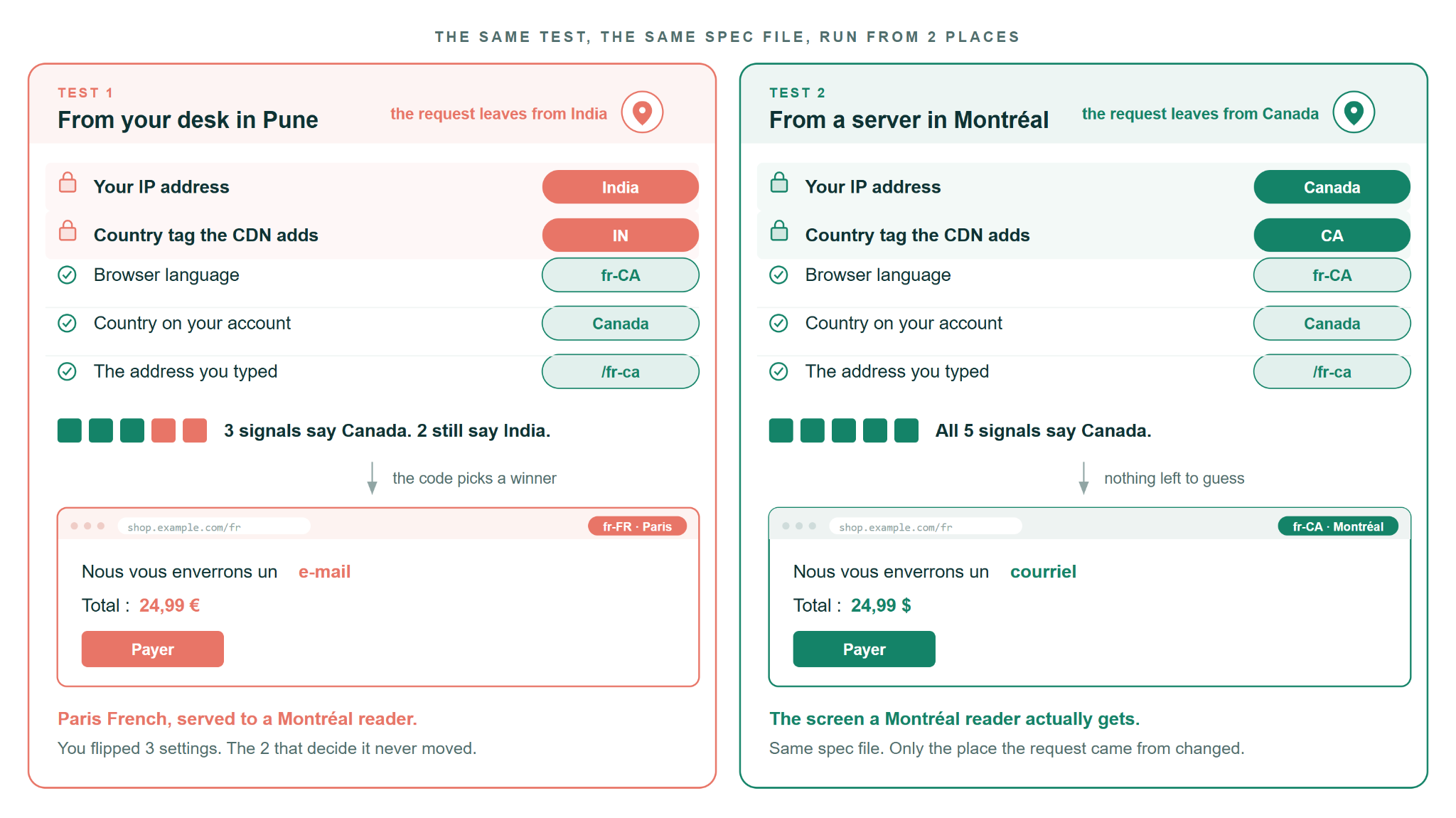
Fig 2: Same test produces different results depending on where the request originates.
Start this week
Ask your developer how a string gets to the screen. Add pseudolocalization to the build before you pay a translator. Use the translation tools and the AI tools as a first pass only.
If all of the screenshots in your suite come from 1 IP address in 1 city, you tested 1 variant of a product. Your product ships in 20 variants. Your users see the other 19 variants, but you don't.
WonderProxy closes this gap. It gives you real IP addresses in 281 locations across 103 countries. Geolocation lookup, the CDN, and language negotiation all see a real user in a real market. WonderProxy works with Playwright, so your current crawler and your current assertions stay the same. You change 3 values, and the suite tests each market where you do business.
Start a WonderProxy trial and run the crawler from the countries where you sell your product.